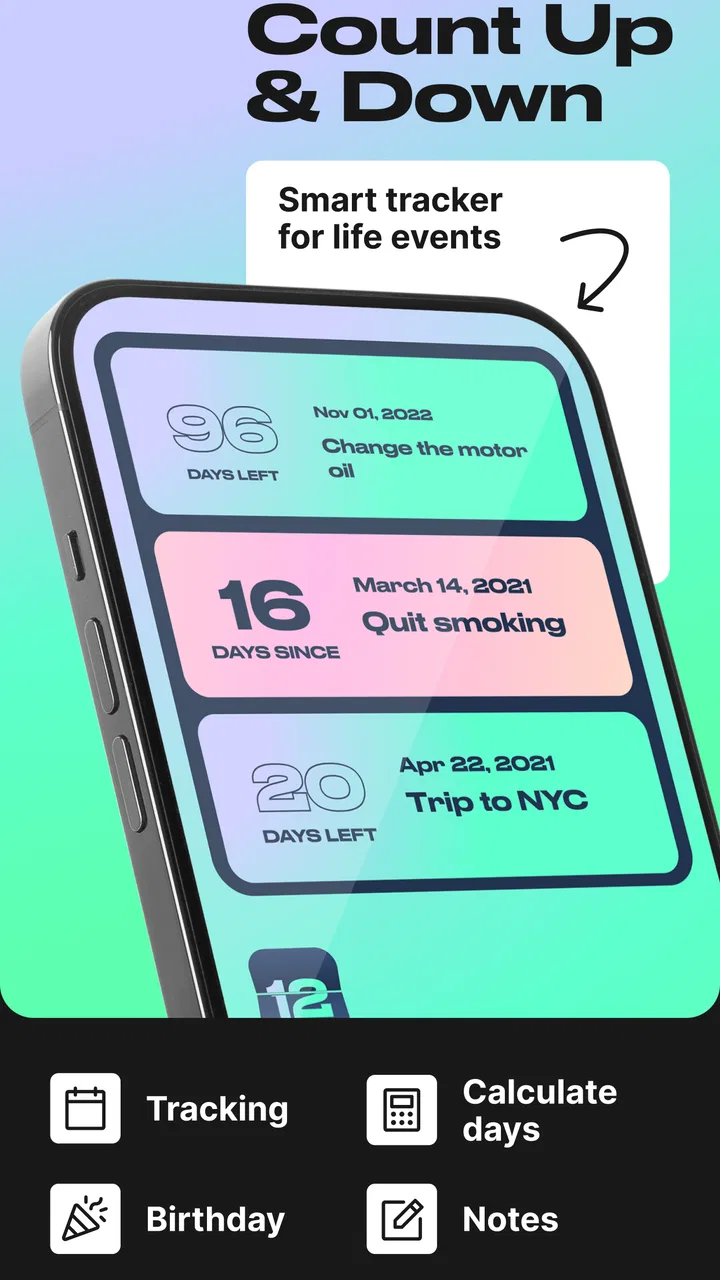
Day Counter. Count Up & Down
- 4.1
- Rating
- 100.00K
- Installs
- Free
- Price
 Analysis by App-foxy
I like apps that solve a small problem without turning it into a project, and Day Counter. Count Up & Down fits that description well. It is an Events app from BITSENS built around a simple idea: keep track of important dates, ongoing routines, and personal targets by showing how much time has passed or how much remains. That sounds modest, but it becomes surprisingly useful when several parts of life need different kinds of reminders.
In my experience, the appeal is not a crowded calendar or a complicated planning system. It is the quick visual answer to questions such as “How long until the trip?”, “How many days since I started this habit?”, or “How close am I to that goal?” The app is free to download, suitable for Everyone, and has reached over 100 thousand installs. Its average rating is 4.4 from around 1 thousand ratings, which matches my overall impression: it is focused, approachable, and more flexible than its short store name suggests.
How Day Counter feels in everyday use
The first thing I noticed is that the app’s value depends on how deliberately you set it up. A single countdown is easy, but the real benefit comes from creating a small collection of counters with clear purposes. Birthdays can sit alongside a future appointment, a personal milestone, and a habit start date. Countdowns answer “when,” while count-ups answer “how long,” so the same screen can support both anticipation and reflection.
You May Also Like

 Blood Strike: 2.5 Anniversary
Blood Strike’s Loadouts Turn Every Drop Into a Tactical Gamble
A close look at Blood Strike’s custom loadouts: how fast access to signature weapons reshapes its battle royale rhythm, rewards preparation, and narrows the gap between fights.

 Pandora - Music & Podcasts
Pandora’s Music Is Easy to Start, but Harder to Recover
Pandora’s strength is its low-effort path from a seed to a station. Its weak spot is how much confidence it asks you to place in connection, setup, and quiet recovery.

 8 Ball Pool
 Is Built on Rivalries, Rematches, and Routine
A close look at the rivalries, rematches, shared routines, and unanswered safety questions that turn a quick pool match into a persistent mobile community.

 Samsung Music
’s Quiet Strength Is Playing What You Already Own
Its reach comes less from spectacle than from dependable access to a personal library. That simplicity is both the app’s strongest retention engine and its ceiling.

 AccuWeather: Weather Radar
AccuWeather Review: A Quick, Clear Forecast for Everyday Decisions
For everyday plans, the best forecast is the one you can understand quickly. AccuWeather makes rain timing, radar, and local conditions easy to act on, with a few trade-offs.

 Hill Climb Racing
Why Hill Climb Racing Still Turns Crashes Into One More Run
A tiny car, a bumpy hill and one more upgrade: Hill Climb Racing keeps resurfacing because its simple chaos makes every near-miss feel personal.
More From Our News Desk



That distinction is important. Many calendar apps are designed around appointments and schedules, while habit apps usually focus on check-ins, streaks, or task completion. Day Counter occupies a narrower middle ground. It is better when you want a visible measure of elapsed time or remaining time than when you need a full timetable, detailed task management, or a complete habit journal.
I would start with only the counters I expect to look at regularly. For example, I might add a family birthday, a holiday, the date I began exercising, and a savings goal. Giving each one a precise, recognizable name matters because a list of vague entries quickly becomes less useful. “Project” is forgettable; “finish the spare-room renovation” tells me exactly why the counter exists.
Speed expectations and the value of a focused interface
Day Counter feels like the kind of app that should be quick to open and understand because its central job is narrow. There is no reason to dig through layers of project information just to see a date difference. That simplicity is its strongest performance advantage from a user’s point of view: the app does not make a small question feel like administrative work.
The counters themselves also reduce mental effort. Instead of calculating the gap between today and a future event, I can read the result directly. For an elapsed-time counter, the same principle helps with long-running goals where I would otherwise forget the exact starting point. This is especially handy for routines that are measured in time rather than completed checklist items.
One practical tip is to use count-ups for things you want to maintain awareness of, not just achievements. A count-up since the last time you contacted a relative, started a course, or began a decluttering project can make an invisible passage of time more noticeable. That is different from a notification-driven reminder: the app gives context when I choose to check it, rather than constantly interrupting me.
The trade-off is that a focused counter is not automatically a complete reminder system. If an event must trigger an alert at a particular hour, I would still rely on a calendar or alarm alongside it. Day Counter is strongest as a visual reference and motivation tool, not as a replacement for every scheduling feature on a phone.
What happens when the list becomes busy
The app’s usefulness changes once the number of counters grows. A handful of entries can make important dates easy to spot, but a large collection may require more attention from the user. This is where naming and grouping habits become more important than the basic date calculation. I would avoid creating separate counters for every minor occasion, because the important ones could lose their visual priority.
Heavy use also exposes a natural limitation of this type of app: several counters can describe time, but they do not necessarily explain what action should happen next. A countdown to a trip tells me how much time remains; it does not organize packing, reservations, or transport. For a multi-step event, I would pair the counter with a notes app or calendar. That combination is more effective than expecting one small utility to manage the entire process.
There is a useful workflow here for long-term goals. I can create one count-up for the start of the goal and a separate countdown for a chosen target date. The first shows consistency, while the second keeps the deadline visible. Used together, they answer two different questions: “How long have I stayed with this?” and “How much time is left?” That pairing is more informative than relying on a single number.
For birthdays, I would review the entries occasionally rather than treating the list as something that never needs maintenance. Dates can become outdated, and an old counter can create clutter. A short monthly cleanup keeps the screen meaningful, especially if the app becomes part of a regular routine.
Reliability, stability, and recovering from interruptions
A date-counter app earns trust through consistency. If I open it for a quick check, I expect the displayed passage of time to remain understandable and the saved entries to remain available. The current version is 1.38.0, and the app has been available since April 11, 2020, giving it a longer presence than a brand-new utility. That history makes it easier to view the project as an established tool rather than a temporary experiment.
Still, I would treat any app that holds meaningful dates as a companion to, not the only home for, important information. For a wedding, medical appointment, flight, or deadline with serious consequences, I would also keep the date in a calendar or another dependable record. A counter is excellent for awareness, but redundancy is sensible when missing the event would matter.
Recovery is also about how quickly I can understand the screen after returning to it. A good personal setup should be self-explanatory: use full names, avoid duplicate entries, and keep the most meaningful counters easy to identify. If I come back after several weeks, “days since language course began” is much more useful than an entry labeled only “course.” Clear labels reduce the chance of misreading a counter during a busy day.
Another recovery habit is to avoid changing a counter casually once it represents a real milestone. If I reset a count-up by mistake, its meaning may be lost even though the underlying event still happened. Before editing an established entry, I would pause and decide whether I need a new counter instead. That preserves the history in a simple, practical way.
The app’s rating of 4.4 suggests that many users find this straightforward approach dependable enough for everyday use. I would not interpret that as a promise that it replaces a full productivity suite. Rather, it supports the idea that the focused experience is working for people who want direct date tracking without a large system around it.
Device constraints and what the free model means
The application supports Android 7.0 and later, so compatibility is broad for many existing Android phones and tablets. That does not mean every device will feel identical. Older hardware may have different background behavior, display scaling, or system restrictions, and those factors can affect any app that users expect to revisit frequently. I would keep expectations realistic on an older phone: the counter itself is simple, but the overall experience still depends on the device and operating system.
Because this is a focused utility rather than a media-heavy app, I would expect its main challenge to be organization rather than resource demand. The important question is not whether it can handle demanding graphics; it is whether the list stays readable and manageable as more entries are added. Keeping the setup selective is therefore both a usability tip and a sensible way to avoid unnecessary clutter.
The app is free, with optional in-app purchases ranging from $2.99 to $19.99 per item. That makes it easy to try the basic experience before deciding whether extra paid options are worthwhile. I would approach those purchases according to my actual routine: if I only need a few personal counters, the free starting point may be enough; if the app becomes a central part of tracking several areas of life, paid additions could make more sense.
For privacy-conscious users, the best approach is to enter only the information needed to identify an event. A label such as “Dad’s birthday” or “renewal date” may be practical, but there is no need to turn a simple counter into a detailed personal diary. This is not a criticism unique to Day Counter; it is a good habit whenever an app becomes a repository for personal dates.
Realistic scenarios where it earns a place
Imagine I am preparing for a move. I can create a countdown to moving day, a count-up for the date I began sorting belongings, and another countdown for a utility appointment. The first keeps the main deadline visible, the second gives me a sense of sustained progress, and the third prevents a smaller but important date from disappearing inside the larger project. The app does not manage boxes or tasks, but it gives the project a useful time-based frame.
For a habit, I would use a count-up as a gentle progress marker rather than a strict judgment. If I started walking every morning, seeing the elapsed time can reinforce continuity. However, I would not use it as proof that I completed every session, because elapsed days and completed actions are not the same thing. That is a subtle but important distinction, and it is why a dedicated habit tracker may be better for people who need detailed daily records.
Families may also find the birthday function practical, especially when several dates need to remain visible. The advantage over relying on memory is obvious, but the advantage over a regular calendar is more specific: a countdown gives the occasion emotional immediacy. Instead of scanning a monthly grid, I can see which birthday is approaching and how far away it is.
Students and independent learners can use a count-up from the day they began a course or study plan. A separate countdown to an exam or submission date creates a useful tension between progress and urgency. Again, I would combine this with a task list for chapters, assignments, and revision sessions. The counter provides perspective; it does not replace the work plan.
Where another kind of app is the better choice
I would skip Day Counter if my main need is a detailed calendar with recurring appointments, invitations, location information, or shared schedules. A calendar is more suitable when the question is “What do I need to do at a particular time?” Day Counter is more suitable when the question is “How long until this happens?” Those needs overlap, but they are not identical.
I would also choose a dedicated habit tracker if I need checkboxes, streak rules, missed-day handling, notes, charts, or several habits recorded every day. A count-up can motivate me, but it cannot by itself verify whether I performed an action. For a serious training plan, medication routine, or structured behavior program, specialized tracking may offer better accountability.
People who prefer an all-in-one productivity system may find this app too narrow. It does not need to be a weakness for everyone; in fact, the narrow scope is why it feels approachable. But if I want calendars, tasks, notes, reminders, collaboration, and progress reports in one place, adding another standalone counter may create more maintenance rather than less.
There is also a psychological consideration. Countdown apps can make deadlines feel more immediate, which is motivating for some people and stressful for others. I would use encouraging labels and avoid filling the screen with distant obligations. A small, intentional set of counters supports awareness; an overloaded list can turn a simple utility into another source of pressure.
My performance verdict after weighing the trade-offs
Day Counter succeeds because it makes elapsed and remaining time visible without demanding a complicated planning method. BITSENS has kept the concept clear: birthdays, habits, goals, and other milestones can all be represented through counters that answer a specific time question. The app’s free entry point, Everyone age rating, and support for Android 7.0 or later make it approachable for a wide range of users.
Its perceived speed comes mainly from the focused purpose and low mental overhead. Its stability is best protected by keeping entries clearly named and maintaining another record for high-stakes appointments. Its resource demands are unlikely to be the deciding issue for most users; the bigger constraint is whether the counter-based model matches the way they organize information. That is the honest dividing line.
The best reason to install it is not that it replaces your calendar, habit tracker, or task manager, but that it gives time itself a simple, visible shape. I would recommend it to anyone who wants a clean way to watch birthdays approach, measure the age of a personal goal, or keep a deadline in sight without building a full productivity system. I would steer someone toward a calendar or dedicated habit app when reminders, detailed records, or shared planning matter more than the passage of days.
For me, the app is most valuable when used selectively: a few meaningful counters, descriptive names, and a quick check as part of an existing routine. Used that way, it stays calm and useful instead of becoming another crowded dashboard. If that sounds like the kind of lightweight time awareness you want, Day Counter. Count Up & Down is a sensible free starting point, with optional purchases available for users who eventually need more from the experience.
FAQs for Day Counter. Count Up & Down
01What is Day Counter: Count Up & Down used for?
Day Counter: Count Up & Down is an app designed to help users track important dates and events. Whether you need to count the days leading up to an event or track how many days have passed since a specific date, this app provides a simple and intuitive interface to manage your timelines efficiently.
02Is Day Counter: Count Up & Down available for both Android and iOS?
Yes, Day Counter: Count Up & Down is available for download on both Android and iOS platforms. You can find it on the Google Play Store for Android devices and the Apple App Store for iOS devices, ensuring broad accessibility regardless of your preferred mobile operating system.
03Can I customize the events and reminders in the app?
Absolutely! The app allows you to customize each event by adding specific names, setting colors, and even adding custom reminders. This personalization ensures that you can easily distinguish between different events and receive timely notifications tailored to your schedule.
04Does the app require an internet connection to function?
No, Day Counter: Count Up & Down does not require an internet connection to operate. Once downloaded, all features are accessible offline. This makes it convenient for users who may not always have access to Wi-Fi or cellular data, ensuring that you can track your events anytime, anywhere.
05Are there any in-app purchases or ads in Day Counter: Count Up & Down?
The app is free to download and use, but it may contain ads. There may also be optional in-app purchases available to enhance the user experience, such as an ad-free version or additional customization features. These options allow you to tailor the app to better meet your needs.
Pros
- User-friendly interface for easy tracking.
- Customizable notifications for reminders.
- Supports multiple events simultaneously.
- Minimalistic design with no clutter.
- Low battery usage and efficient performance.
Cons
- Limited free features in the basic version.
- No cloud sync for event backups.
- Ads can be intrusive in free version.
- Lacks integration with calendar apps.
- No widget support for quick access.

Day Counter. Count Up & Down
Gallery